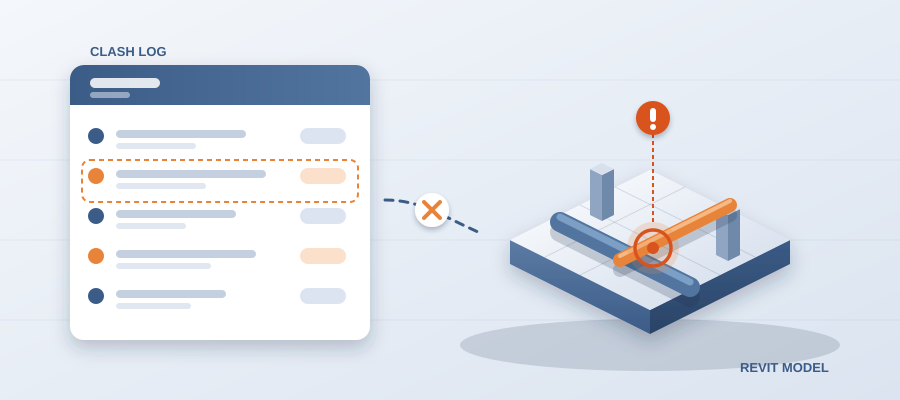
Your Clash Log Is a Lie. Here's Why.
The Log Was Right When You Made It
Many clash logs are wrong by the time they are shared. The coordinator was not careless. The building keeps moving and the file you sent keeps sitting still. You export a list, the architect shifts a corridor, and now your log describes a building that no longer exists. Nobody tells you. The log just ages out.
A clash log is a list of conflicts between elements: a duct through a beam, a pipe through a wall. The model already knows where everything is. It holds the geometry and the parameters together. Every wall, fitting and fixture is an object with parameters. The thing the log is trying to describe already exists inside the file.

The trouble starts on the way out. Push that information into a PDF or a spreadsheet and you cut the issue off from its source. The spreadsheet becomes a photograph of Tuesday. It cannot know Wednesday happened. Every revision after export turns your log into a historical document.

So coordinators re-export and re-check. They keep a mental list of what moved since the last version and patch the log by hand. That reflex is not a skill. It is a tax. It gets heavier on larger jobs and larger teams, and it never catches everything. It also adds up to the 11 hours a week many teams lose working out which model version is current.
Here is the plain version. If your log lives outside the model, it drifts the second the model changes. If it runs inside the model, it moves with it. BidLight keeps one live record of the project inside Revit and Navisworks, with issues pinned to the same geometry the architect is editing right now.
Where Issues Slip Away
Issues escape a log in three places, and each one is a gap between systems. The first sits between the model and the export. Somebody forgot to reload a linked file. A workset was hidden during the last review. Two versions of the same level exist and the review ran against the one nobody is designing against. The list comes out clean and wrong. That is the worst kind of wrong, because nothing looks broken.

The second sits between the export and the tracking sheet. An issue gets combined, renamed or merged with a similar one. Part of the problem lands in a row that never gets assigned to an owner. Scanning will not find it, because the totals still look reasonable. You find it in the field, when the crew runs into the beam on level three.

The third sits between the last export and the day the trade starts work. This is the expensive one. Design changes land in the middle of coordination, which is normal on any project worth building. Each change invalidates part of your log. Miss one and the trade builds to a layout that stopped existing last Thursday. A clash caught in the model costs about $50. The same clash found in the field costs $5,000 to $50,000.
All three gaps are silent. A missing issue throws no error. A stale wall type does not flag itself. The log still totals, the meeting still happens, and the error only shows up as rework. That is how a team ends up closing 40 issues on paper and finding 41 open in the field.
The fix is not discipline. Discipline is what you fall back on when the process is broken. The fix is removing the export step, so there is no gap to slip through. When issues are pinned to elements, the issue is never a copy. It is a live pointer into the same file everyone else is working in, so it cannot be older than the model.

What Live Looks Like Day to Day
Say a mechanical engineer moves a rooftop unit four feet and reroutes the duct run feeding it. In the old workflow, that change waits in a queue. Someone has to notice it, re-export the views, update the log, tag the affected trades and chase the answer. Best case, that takes hours. Real case, it happens Thursday, if it happens at all.

In a live workflow, the model is the record. The duct run is shorter or longer the moment the designer commits the change, and the next publish shows it. No export. No log refresh. No one in the middle deciding whether the change matters. You look, and the comparison is current, because it is a read of the file, not a memory of it.
How do you keep a log against a live source? You publish from Revit or Navisworks. Every publish is a versioned snapshot with its own files, author and milestone. Any two revisions compare element by element, grouped by structural, MEP, envelope and interior. That clears the tedious first pass and leaves the coordinator on what they are good at: judgment on the few changes that need a human eye.
Issues are not a separate exercise either. They pin to the element and carry the sheet and revision they came from. An issue closes only with a screenshot, a tagged user and the model commit that fixed it. Finding out what changed between two exports takes about 15 minutes instead of a 90-minute meeting.
And none of it freezes. If the door moves, the issue moves with it. That is the whole idea. The issue and the model share the same live source.


## Why This Keeps the Schedule Instead of Just Saving Time
The obvious win is hours. Teams that stop re-exporting and re-checking put those hours back into the work that keeps the job moving: reading the model, questioning assumptions, finding the clash nobody else caught. Plans are per licence, with unlimited projects on every plan. Basics is $260 a year.
The bigger edge is accountability. When a GC asks why a trade is behind, you open the model and show them. That element, that issue, that owner, that revision. There is no gap between what you say and what the model holds, because there is no second version of the truth. The 6am digest tells every owner what they own, and the project view shows who is behind while there is still time to recover.
It also changes what you can show clients. A client at design stage asks what a layout change touches and who has to act. You can answer in minutes instead of days. On the hyperscale programme, BidLight helped save 18,000+ hours and resolve 8,900+ issues. Answers show up with the changed elements, not a promise to get back to someone.

There is a reputation angle too. Reputation usually comes down to consistency: the airline that lands on time, the team that never surprises you on site. In AEC, that is being the firm whose coordination holds. When your log is live, your reputation stops depending on whether this month's coordinator was careful. It depends on the system, and the system does not get tired.

BidLight also does the work with you when you want that. Our done-for-you BIM services cover execution plans, 4D sequencing, fabrication detailing and spooling. Some firms want the software and run it themselves. Some want the output without the staffing question. Either way the record comes from the model.
What to Do Monday Morning
Begin with one active project, not the whole portfolio. Pick something mid-design where changes are still landing. That is where drift shows up fastest and the value is easiest to see. Publish the model, compare it to the last revision, and set the result against the log you already have. Do not look for agreement. Look for differences. Every difference is a place your old process was quietly losing issues.
Then change one habit. Stop exporting to track. The export is the moment the log starts dying. Keep the issue attached to the model and most of the downstream checking disappears on its own. Coordinators do not enjoy copying and pasting between files, and they do not enjoy redoing work they already did. Give them a source that stays current and the job becomes what they trained for.

Finally, spend the time you save on something other than catching up. When you find the changes in 15 minutes instead of 90, you can bring answers to the first design meeting instead of the third. You can review a design option while the client is still deciding. You can answer the question in the room instead of promising a follow-up. That is where the schedule is protected. Not in the software, but in what the software lets you do in front of a client.

The takeaway is short. A log exported on Tuesday describes the building that existed on Tuesday. Stop coordinating from yesterday's truth. Keep one live record of the project inside Revit and Navisworks, let the issues ride on the same model, and the picture you defend will be the picture that is there.