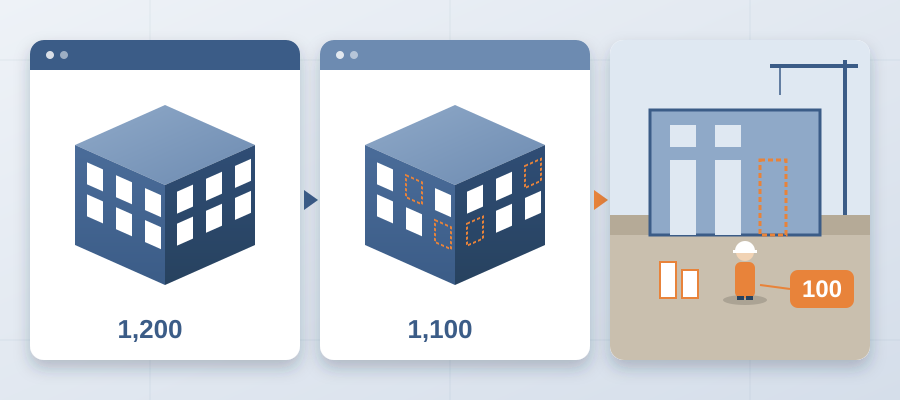
Your Model Has 1,200 Doors. Your Coordination Set Shows 1,100. The Missing 100 Surface on Site.
Where the 100 Doors Went
On the Revit side, the door schedule reads 1,200. That is the count the architect published, and the model carries every one of them with a type, a fire rating, a frame, a closer, and a hardware set attached. On the coordination side, the issued set reads 1,100. Both files are open on the same afternoon. Both look finished. That is why nobody catches it.
The gap usually starts with a stale export. Somebody ran the door schedule for the coordination package at 60% design, then design went to 90% and added a wing, a stair enclosure, and a cluster of service doors. The team kept working from the earlier export because that was the file they had already cleaned up, sorted by type, and marked up. The model moved. The package did not.
Other times it is a filter. The export drops doors on a workset nobody selected. Doors hosted in a linked model slip through. A curtain wall with integral doors sits in the wall category instead of the door schedule, so the count comes out light without anyone editing a single cell.

Here is the part that stings. A missing door is never just a door. It is the frame, the hardware set, the closer, the fire-rated assembly, the opening in the wall, and the trade coordination around all of it. Miss 100 of those and you have missed a small package of work, not a line item.
Now picture the field finding it. The crew reaches a room that has a door in the model and none in the set. Someone stops work. Someone calls. Someone looks for the revision. Behind a stalled room, the painter, the flooring crew, and the hardware commissioning all shift. Idle field labour behind an unresolved conflict runs $15K to $50K a week.
Why the Door Count Drifts and the Record Does Not
A model is a living thing. A coordination set is a snapshot. Every time a designer moves a corridor, splits a room, or adds a rated assembly, the door count changes. The model absorbs that change in seconds because it is parametric. The package absorbs it only when a human notices, and humans notice late when the work is buried in a 40-tab spreadsheet.
This is the core problem versioned exports solve, and it is not really about the software. It is about keeping the model and the record of its changes on the same clock. When every publish is a snapshot and any two snapshots compare element by element, the count cannot drift unnoticed because there is only one place to look.

Think about how your team handles change today. The architect sends a revised model on Tuesday. Your coordinator is mid-review on two other jobs. The revised model sits in a folder until Thursday. By the time the new door schedule gets exported, the package has already been built on the old count and sent. That is not negligence, that is capacity.
The comparison works differently because it reads geometry and metadata directly. It lists doors by what the object is, not by what somebody typed into a column three weeks ago. The 100 doors added between 60% and 90% show up as 100 added elements, grouped by category, with the author and the milestone of the publish that introduced them.
BidLight does not run automated clash detection, and it does not decide what the doors mean for the schedule. People do that. What it does is remove the arithmetic and the hunting, so the person checking exceptions is looking at a short list of changes instead of counting doors by hand. That flips the job from data entry to judgment.
What This Costs on a Real Job
Picture the handoff day. Your package is tight, the schedule is tight, and you send it on time. Six weeks later the field starts hanging doors and the superintendent calls because the door schedule from the model does not match the door schedule in the issued set. Now you have a problem with three costs attached.

The first cost is the doors themselves, ordered late. You buy 100 doors that were not in the set, with rush freight because you are already past the buyout window. The second cost is labor. Your door installer planned for 1,100 units, and the extra 100 come out of a crew that is already committed to another part of the job. The third cost is time, and time is the one that spreads.
Once a door package runs late, the painter, the flooring crew, the hardware commissioning, and the final inspection all shift. A clash that sits 47 days can burn $28,000 in idle field labour, and a trade standing around waiting for a room to close up costs the same way. That 100-door gap becomes a scheduling problem, and scheduling problems land on the GC.
This is exactly where a live record earns its keep. When the model carries the history, you see the door count, the revision, and the owner in one place. When the count changes, the comparison changes with it, and you see that on the same afternoon instead of six weeks later when the field tells you.
BidLight keeps one live record of the project inside Revit and Navisworks. You publish from your model and the snapshot is there in minutes. The comparison updates when the design changes. So the missing 100 doors get caught on the day the design added them, not on the day the field installs them, and catching it in the model costs about $50 against $5,000 to $50,000 on site.

How to Stop Missing Elements Before You Send
The first habit is simple. Never coordinate from a static door schedule. Work from the model, and treat any spreadsheet as a report, not as the source. If your coordinator is maintaining a count by hand, that count is already behind the design.
The second habit is a reconciliation check before every handoff. In about 15 minutes instead of a 90-minute meeting, run a comparison between the model revision and the revision your set was built against. Anything that comes back with a category you did not expect gets a second look. A door count that reads 1,100 against a model that reads 1,200 is a five-second catch when the two revisions sit side by side.
The third habit is pinning. An issue about the missing doors should sit on the elements, not in an email. It carries the sheet and revision it came from, so the next person knows which set it refers to. It closes with a screenshot, a tagged user, and the model commit that fixed it, so it does not come back on site.
The fourth habit is treating the review as a service, not just a document. When your firm can produce a defensible change list in minutes, clients value early design answers. That is work worth offering, and it is the same engine that protects your handoffs.

Plans run from Basics at $260 per licence per year to Max at $590, with custom Enterprise terms. Every plan includes unlimited projects. If your team would rather not run the software itself, BidLight does done-for-you BIM work covering execution plans, 4D sequencing, and fabrication detailing and spooling. Either way, the point is the same. The count you coordinate is the count you build.
The Record You Can Defend
The reason this door story matters is not that someone made a mistake. It is that the mistake was invisible. Two documents, each internally consistent, each pointing at a different reality. That is how margins die on commercial work, quietly and in the gap between two systems that never spoke to each other.
When you coordinate from a live model record, you stop defending a spreadsheet and start defending the design. If a client asks why the door count is 1,200, you show them the model. If they ask when it changed, you show them the revision comparison. That is a different conversation than the one where you explain how the count got stale.
There is a practical piece to this too. Teams that see changes on the day they are made can answer faster and with better information. The 6am digest puts each owner's open issues in front of them at the start of the day, so the person behind is visible while there is still schedule to move work.

And there is a retention piece. Coordinators leave when the job is copy-paste and firefighting. They stay when the job is judgment. If the software handles the comparison and the history, your best people spend their time on sequencing, trade handoffs, and strategy, which is the work they actually wanted to do.
The takeaway is plain. Your model has 1,200 doors. Your coordinated set should have 1,200 doors. One live record of the project inside Revit, with every export versioned and every change diffed, is how the two numbers stay equal. Stop chasing scattered updates, and stop paying for the 100 doors nobody checked.