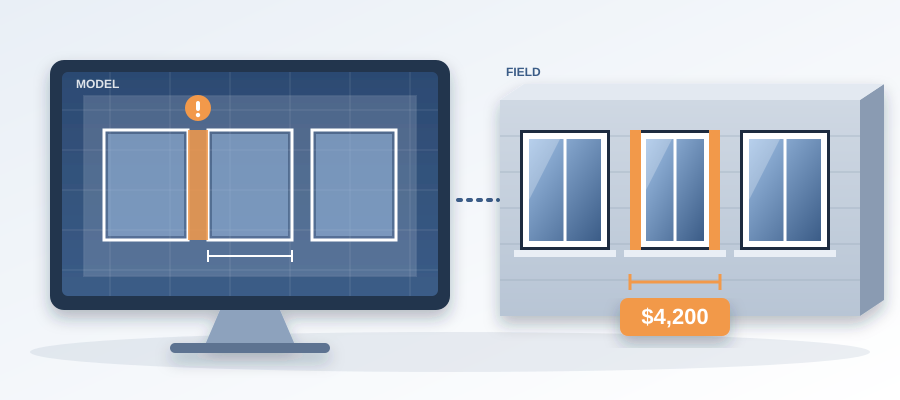
You Put $4,200 of Windows in a Wall. The Model Said Gap.
The $4,200 Window Shift Nobody Saw Coming
You put $4,200 of windows in a wall. The model said gap. The gap said reorder. Here is how that happens.
A single window moved six inches in the architect's model. You could not see it by eye. The wall looked the same. But the window now sat against a structural column, and the opening no longer matched the rough-in. The crew had already set the frames. So the team pulled them, reordered the window assembly, paid for new units and ate two weeks of delay.
One geometry change went unnoticed until the field. That is the whole story.

The window was not exotic. It was a standard double-glazed unit with a low-E coating, two of them in that wall, $4,200 in materials. Add the labor to pull the set frames and reinstall, plus the lift that had already moved to another site. The schedule slip pushed the curtain wall sub into overtime. The general contractor re-sequenced the interior rough-ins. Nobody caught it because the drawings everyone was working from were two revisions old.
The old way is to compare the sets by eye. That takes days. In a deadline crunch the team skips it and trusts that the changes were minor. That is how $4,200 slips through. That is how a small shift turns into a change order and the change order turns into a claim.
You do not have to live in that gap. When the architect publishes a new revision, BidLight compares it to the last one element by element. The window that moved shows up as a moved element, grouped under envelope, with the column it now touches. You see it in about 15 minutes, not in a 90-minute meeting three weeks later.
Why a Moved Window Hides Between Exports
The root issue is that nobody is looking at the same version. The model is one thing. The schedule is another. The PDF set the field is holding is a third. When a window moves, one of them still shows the old opening. The fabricator orders from one, the framer builds to another, and the mismatch shows up in the field.

Now picture the team working from an export made two weeks ago. The model has changed 14 times since. Each change moved something, and nobody re-exported. The sheet still says the window is 3'0 x 5'0. The model says 3'6 x 5'0. The header needs to be wider. You buy windows to the old size. They arrive too narrow. You send them back or you modify the framing. Either way you eat the labor and the delay.
That mismatch is not rare. On a commercial job the model changes many times between design development and construction documents. A door swings the other way, a duct reroutes, a window shifts. Each change can touch dozens of elements. Teams lose about 11 hours a week working out which version is current. That is the silent budget killer. It does not announce itself. It shows up months later as a backcharge.
BidLight keeps every publish as a versioned snapshot with its own files, author and milestone. Any two revisions compare element by element and break down by category: structural, MEP, envelope, interior. You are never wondering whether you have the latest. You open the latest and see what moved since the one you built from.
Pin the Issue to the Window, Close It With Proof
Seeing the change is half of it. The other half is making sure someone acts on it. In most teams the finding goes into an email, the email goes into a thread and the thread goes nowhere.

In BidLight you pin the issue to the window itself. It carries the sheet and the revision that raised it, so nobody has to ask which drawing you meant. You tag the owner, the framer's coordinator or the architect, and the 6am digest puts it in front of them the next morning with everything else they own.
Closing it is gated. The issue closes only with a screenshot, a tagged user and the model commit that fixed it. The architect moves the window back, publishes, and the commit is linked to the issue. A closed issue means the model says so. It does not mean someone said so in a meeting.
The project view shows every open issue against its owner. If the window issue is sitting with someone who has not touched it, you see that while there is still schedule left to move work, not after the lift has gone.
What the Saving Looks Like
Do the arithmetic on this one wall. Caught in the model, the shifted window is a short note and a revision. The cost of fixing a clash like that in the model is about $50. Found in the field, the same clash runs $5,000 to $50,000 once you count reorders, crews standing around and the re-sequencing that follows.

And if it sits unresolved, the idle labor adds up. An unresolved clash can burn $15K to $50K a week in idle field labor. That is the number to put in front of the owner when someone asks why coordination needs 15 minutes a day.
That is the kind of saving BidLight was built for. It does not change the quality of your drawings. It makes sure that what changed in the model is in front of the person who has to act, with proof when it is done. On the hyperscale programme this came to 18,000+ hours saved and $12.3M in cost saved.
The fear used to be that more coordination means more meetings. It does not have to. You stop being the team that chases updates and become the team that already knows what moved. If you want to see it on your own model, call us at +1 480 859 4697 or book a video call.
A Walkthrough: From Publish to Proof
Here is how the same window would play out with the record kept as the work happens.

Monday evening the architect publishes revision 14. BidLight stores it as a snapshot with the author's name and the milestone. Nobody has to remember to send a note.
At 6am Tuesday the digest lands. Your coordinator sees that the diff for envelope shows one window moved and one opening changed. Fifteen minutes later they have compared revision 13 with revision 14, found the column conflict and pinned an issue to the window. They tag the architect and the curtain wall sub.
By lunch the architect has moved the window back and published again. The commit links to the issue. The coordinator checks the new revision against the old, sees the window is where it should be, adds a screenshot and closes it.
Nothing was reordered. Nothing was pulled out of a wall. Nobody sat through a long meeting to work out who knew what, and when. The history is in one place, so a later question about who changed what has an answer that takes seconds.

What to set up first
- Publish every revision from Revit or Navisworks, not just the big ones. Small shifts are the ones that hurt.
- Agree who owns each category: structural, MEP, envelope, interior.
- Pin every cross-discipline question to the element, not to a thread.
- Read the 6am digest before the first call of the day.
That is the whole routine. It is short on purpose.