The 2-Inch Shift That Cost Up to $50K
The Two-Inch Move Nobody Flagged
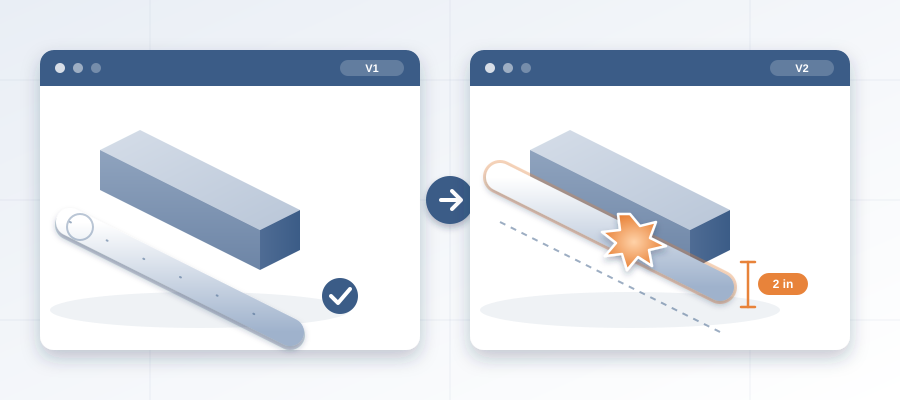
The wall moved two inches. The field bill moved up to fifty grand. A corridor shifts off the grid, the door swing changes, the ceiling drops below the duct, the mechanical run gets rerouted. Now there is a sprinkler rework nobody planned. You find out when the crew is standing in the corridor, not when the designer made the edit.
Here is why. The change lives in Revit. The people who have to act on it live in email, Teams and a markup somebody saved on Tuesday. The two have never met. From then on, the markup is a photograph of Tuesday. Every Wednesday change is invisible until a human happens to notice.

That is the part that stings. It was never a two-inch problem. It was a change-detection problem. The designer made a legitimate edit. The geometry updated in seconds. The people downstream had no way to follow it. So the conflict sat there, quietly waiting, while the design kept moving.

Six weeks later a project manager asks why the mechanical rough-in is stuck. The answer is buried in a Revit file nobody compared with the last one. You do not have a drafting problem. You have a tracking problem, and it costs you on every project run this way.
You already know the question you want answered. What changed, who changed it, and who has to act? You should see that before it becomes rework, not after.
Why a Live Record Beats a Thursday Export
Most coordination runs on a file somebody hands you. That file is already stale. The export button is the moment you begin losing. One live record of the project inside Revit and Navisworks changes the math, because every publish is a versioned snapshot with its own files, author and milestone. When the wall moves, the next publish shows it.
BidLight keeps that record inside Revit and Navisworks. You publish from the model, and any two revisions compare element by element. No hunting through folders. No Thursday afternoon session where you wonder if the markup matches the screen.

The payoff: you see the two-inch move while it is still a line on a drawing. You pin an issue to the wall, tag the person who owns the corridor, and ask whether the shift is intentional. That is about 15 minutes instead of a 90-minute meeting. Not a fire drill three weeks later, with the crew already standing there.

There is a second win people do not expect. When comparing revisions takes minutes, it stops being a once-a-week event. You compare every publish, catch each shift early, and let the diff decide what needs a conversation. That is how coordination gets ahead of the field.
How the Issue Follows the Geometry
Every issue is pinned to the elements it concerns and carries the sheet and the revision it came from. Closing one is gated: a screenshot, a tagged user and the model commit that fixed it. Nobody has to remember where the problem lived. It is attached to the wall.
Here is the concrete version. The corridor wall moves two inches. The next publish shows the change in the comparison, grouped by category: structural, MEP, envelope, interior. The door count changes from one to two. The ceiling element sits lower than the duct. Each of those shows up as a named change against a named element, not a surprise. You assign each one from evidence, not memory.
That is also the answer for a team that keeps getting burned by late design changes. The best setup is not the one with the longest feature list. It is the one where the record still matches the model on the day the trade starts work.


A process that only speaks on import day is a lagging indicator. A record that updates on every publish is a leading one. If you remember one thing, make it this: the issue rides on the same model the designer is editing, so the shift and the flag move together.
What the Two-Inch Shift Touches
It is tempting to call a two-inch move cosmetic. It never is. Two inches can push a wall past a fire separation. That changes the assembly type and the rating, and with them the material spec and the inspection sequence. Two inches can drop a corridor ceiling below a main duct. That forces a reroute, then a coordination meeting, then a schedule slip nobody planned.
It can also break a door clearance, add a second door leaf, or push a sprinkler head outside its coverage pattern. Each one is a small edit in Revit and a real cost on site. The bill feels huge because you are paying for five or six consequences at once, and you were told about one.
Now multiply by a hundred edits across a project. The corridor wall is the visible one. The rest are quiet. A column moves six inches. A shaft gets wider. A room tag changes and the finish schedule shifts with it, unseen. If the team only checks when someone remembers to check, most of these arrive in the field as rework.


That is the trap. You do not lose fifty grand in one dramatic moment. You lose it a little at a time, in unflagged edits, each too small to catch alone. By the time the rework lands, the trail is cold and the schedule has moved on.
A live record closes that gap. Every edit shows up in the comparison, and every change that matters becomes an issue with an owner. You stop finding out about changes from the crew.
The Real Cost of Finding It in the Field
Coordinators spend too much of the week on work the model should do. Working out which version is current. Checking what moved. Reconciling the markup against the screen. Re-running the same meeting. That is the 11 hours a week lost to reconciling versions, and every hour is an hour not spent on the clashes that matter.
The numbers on the other side are plain. A clash caught in the model costs about $50. The same clash found in the field costs $5,000 to $50,000. And an unresolved one can burn $15K to $50K a week in idle field labor. On the hyperscale programme, BidLight helped save 18,000+ hours and $12.3M in cost. That is what happens when changes show up before the crew does.
On the cost of the software, Basics is $260 a year per licence, with unlimited projects on every plan. Set that against one reworked corridor. One two-inch shift can outweigh years of licences in a single field correction.


If cost is your sticking point, ask it plainly. What does it cost to catch this in the model, next to what it costs to find it in the field? One missed mechanical reroute can run well past a year of licences.
There are free ways to track changes, such as shared folders and spreadsheets, and people reach for them every day. Free is fine for a side project. It is not fine when the schedule carries your name. A change you act on needs a source you can point to.
Making This Your Default, Not Your Exception
Going from stale exports to a live record is not a technology project. It is one change in default behavior. You stop asking what the model looked like when somebody exported it. You ask what it looks like right now, and what moved.
First, get one live record of the project running inside Revit and Navisworks. We walk you through it and set you up from your existing model. From there, every publish produces a comparison, and your team reviews changes instead of rebuilding the picture.
Second, make ownership visible. The 6am digest tells every person which issues they own, and the project view shows who is behind while there is still time to recover. That is how a two-inch shift reaches the right person the same morning, not three weeks later.


Third, close with proof. When the architect or the GC asks how an issue was resolved, you point at the screenshot, the tagged user and the model commit. Nothing in that chain is a guess. That is the quiet advantage of a live record. It saves you time, and it makes every closure auditable.
If you take away one idea, make it the smallest one. The wall moved two inches. The flag should move with it. If your setup cannot do that, the fifty-thousand-dollar field fix is not a surprise. It is just late.